
Topic 6 / 8 · In the app: Settings › Help & guide
Backup and recovery code
Why back up
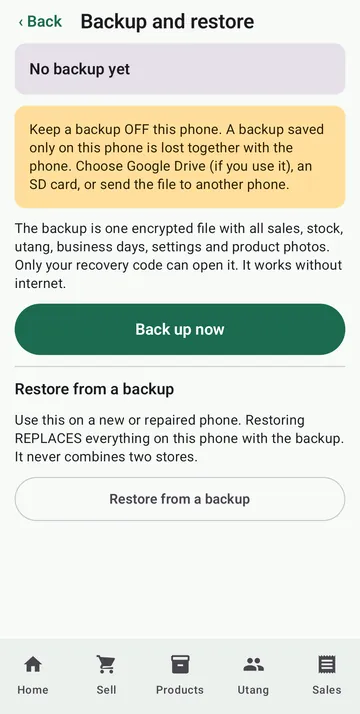
- Your records are only on this phone. There is no automatic cloud backup. If the phone is lost or broken, only a backup can bring your store back.
Make a backup
- Settings › Backup and restore › Back up now. A backup needs a recovery code: the first time, the app asks you to create one.
- Choose where to save the file: Google Drive (if you use it), an SD card, or send it to another phone. The file name ends in .cposbak.
- The backup is one encrypted file with your sales, stock, utang, business days, settings and product photos. The shopping list is not included.
- Keep a copy OFF this phone. A copy saved only on the phone is lost with the phone.
The recovery code
- Every backup is locked with your recovery code. Write it on paper (your recovery card) and keep it away from the phone.
- If you lose both the phone and the recovery code, no one can open your backups, not even us.
Restore on a new phone
- Settings › Backup and restore › Restore from a backup. Choose the file, type the recovery code, then tap Open and check.
- Restoring REPLACES everything on that phone with the backup. It never combines two stores.
Still stuck? Email support@cuartapos.com. Please do not send your recovery code, passwords or customers' private information.