
Topic 1 / 8 · In the app: Settings › Help & guide
First sale and change (sukli)
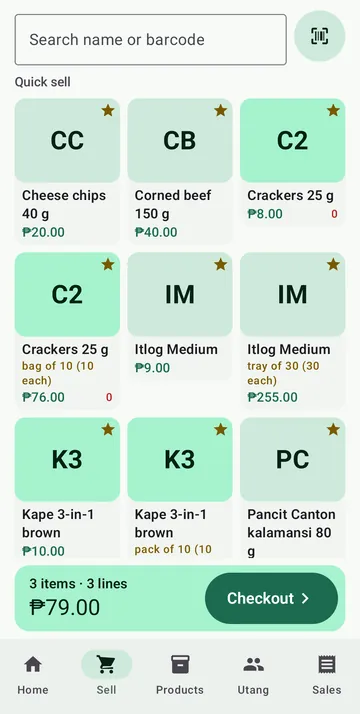
Make a sale
- On Sell, tap a product, type its name or barcode in the search box, or tap Scan barcode.
- Each tap adds one to the cart. Use − and + to change the quantity.
- Products you pin appear as big tiles in Quick sell.
- Tap Checkout, then choose Cash, E-wallet or Utang.
Cash and change
- Type the money the customer gave in Cash received, or tap Exact.
- The app shows the Change (sukli) to give back. If it shows Short by, the money is not enough yet.
- Tap Complete sale. The sale is saved and the stock goes down.
E-wallet
- Check the GCash or Maya payment on your own phone first. Cuarta POS records what you mark; it does not check payments.
If something goes wrong
- If you see “Sale NOT saved”, nothing was recorded and no stock was deducted. Try again.
Still stuck? Email support@cuartapos.com. Please do not send your recovery code, passwords or customers' private information.