
Topic 2 / 8 · In the app: Settings › Help & guide
Add, edit and archive products
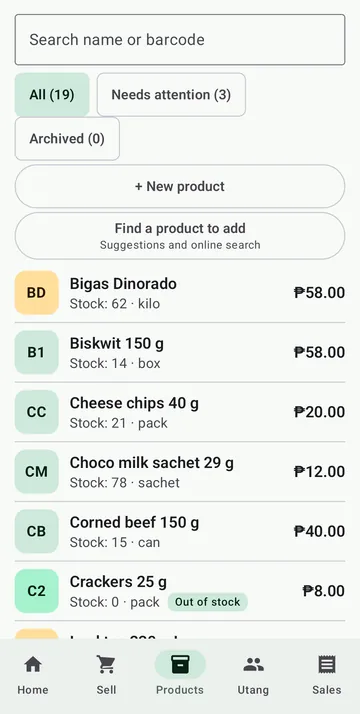
Add a product
- Products › New product. Only the name and selling price are required.
- You can also add the selling unit (piece, sachet), buying cost, starting stock, barcode and a photo.
- No buying cost? Profit then shows as “not available”, never as zero.
Edit a product
- Open the product › Edit product to change the name, units, prices or barcodes.
- Changes apply to new sales only. Past sales keep the name, price and cost they had.
- To sell a pack or box too, use Add a bigger unit. Selling one deducts that many from stock.
Archive and restore
- Archive hides a product from Sell, search and Quick sell. Nothing is deleted: its sales, stock history and utang stay.
- To bring it back: Products › Archived › open the product › Restore product.
- Products cannot be permanently deleted. Archive them instead.
Still stuck? Email support@cuartapos.com. Please do not send your recovery code, passwords or customers' private information.